

SEMrush for Beginners: The Complete Guide (2026)
SEMrush for beginners feels overwhelming for one reason: it’s built like a cockpit, not a front door.
You log in for the first time and there are 50+ tools in the sidebar, a dashboard showing numbers you don’t understand yet, and zero indication of what to actually click first. That’s not a skill gap. That’s just how the product works on day one, and it trips up most people regardless of how technically minded they are.
This guide is the front door. By the end you’ll have a clear picture of what SEMrush does, which five tools actually matter when you’re starting out, and a realistic day-by-day plan for your first week so the subscription doesn’t sit idle.
What is SEMrush?
SEMrush is a research platform for SEO and digital marketing. At its core it does two things: shows you what’s happening on your own website, and shows you what your competitors are doing in search.
The SEO part gets most of the attention because that’s where beginners see the fastest returns. But the platform also covers paid advertising research, content marketing, and competitive intelligence across social and display. It’s a lot, so most people stick to the SEO tools for the first few months.
Here’s the mental model that actually helps. SEMrush shows you two categories of data. First: what’s happening on your own website, so technical health, keyword rankings, and visibility over time. Second: what your competitors are doing, meaning which keywords drive their traffic, where their backlinks come from, and how strong their domain is.
Every tool in SEMrush is a different lens on one of those two things. That’s it, and nothing in the sidebar is more complicated than that framing once you accept it.
One thing worth being clear about before going further: SEMrush data is estimates, not live Google data. The platform pulls from its own database of 25 billion+ keywords across 140+ countries, but traffic figures for any domain are projections built from ranking models and assumed click-through rates. Useful for comparison and direction. Not useful as precise facts.
What does SEMrush actually do?
Strip the marketing away and there are five things SEMrush genuinely does well. Everything else is either an extension of one of these or something you won’t need for months.
Keyword research. Type in any word or phrase and SEMrush returns monthly search volume, a difficulty score showing how competitive ranking for it would be, and hundreds of related terms you hadn’t considered. This is the work you do before writing anything, so you stop creating content nobody searches for.
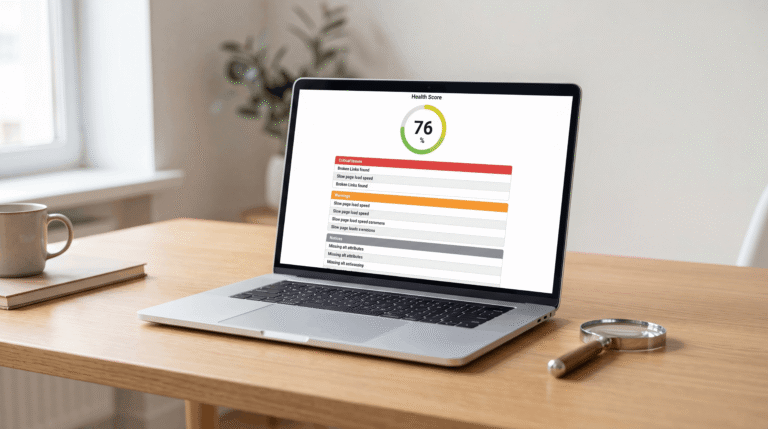
Site auditing. SEMrush crawls your website the same way Google does and comes back with a prioritized list of technical problems. Broken links. Missing meta descriptions. Pages accidentally blocked from being indexed. Slow load times. It assigns a health score out of 100, and your score will probably be lower than you expect on the first run. That’s the point of running it.
Competitor research. Enter any competitor’s domain and SEMrush shows what keywords they rank for, their estimated monthly traffic, and who links to them. You’re looking at their SEO strategy in plain sight. Most small site owners don’t use this enough, or at all.
Rank tracking. You give SEMrush a list of keywords you care about and it checks your Google rankings for every one of them, every single day, so you find out if the content you published last month actually moved anything.
Backlink analysis. Backlinks, meaning links from other websites pointing to yours, remain one of Google’s strongest ranking signals. SEMrush shows your full backlink profile, flags links that might be hurting you, and shows exactly where competitors are getting their links from, which becomes a list for outreach later.
The tools that actually matter for beginners
SEMrush has 50+ tools. You don’t need most of them right now. These five produce 90% of the early value.
Keyword Magic Tool
This is the one you’ll live in at the start. Enter a seed keyword, anything relevant to your site, and it returns thousands of keyword variations with volume, difficulty, and search intent attached to each.
The filter that changes everything for new sites is Keyword Difficulty, shown as KD%. Cap it at 40. Below that you’re looking at keywords where a newer site can actually compete. Above 40, though, you’re fighting pages with years of domain authority behind them, and that’s a war you won’t win yet.
Set minimum monthly volume to 100 at the same time. Below that, you’re writing for almost nobody.
For a full walkthrough of how to use this tool, read the SEMrush keyword research guide.
Domain Overview
Your first move when researching any competitor. Enter their URL and within ten seconds you have their estimated monthly organic traffic, top keywords, authority score, and paid advertising spend. Five minutes in this tool tells you more about a competitor’s SEO strategy than reading their blog for a year.
Site Audit
Run this before anything else. Keyword research is exciting but if Google can’t properly crawl and read your pages, no amount of optimization helps. Site Audit surfaces crawl errors, broken internal links, pages accidentally blocked from indexing, and missing technical elements that quietly hurt rankings.
Clean the foundation before anything else. The SEMrush site audit guide walks through the full setup and how to read the results.
Position Tracking
Once you have content live, this is how you track whether it’s working. Add your target keywords, set your target location, and SEMrush logs your Google rankings for each one, updated daily. The number to care about is directional movement over weeks, not your exact position on any single day.
The SEMrush position tracking guide covers setup and what to look for once the data starts coming in.
Organic Research
Find this under the competitor analysis section. Enter any domain, a competitor or your own, and see every keyword it ranks for with position, volume, and estimated traffic per keyword. Combine this with the Keyword Gap tool, which shows keywords competitors rank for that you don’t, and you have a content roadmap handed to you.
For a step-by-step approach to turning this data into a content plan, read the SEMrush competitor analysis guide.
How to use SEMrush for beginners: your first week
Most SEMrush guides throw 25 tasks at you. That’s not realistic. Here’s a focused sequence that produces real usable data in roughly five hours across your first week.
Day 1: set up your project (30 minutes)
Log in and create a Project by entering your domain. This is the container that unlocks the tracking tools. Position Tracking, Site Audit, and On-Page SEO Checker all run inside a project, so skipping this step means those tools have nothing to pull from.
Don’t skip the setup wizard. A lot of beginners do, and they then spend an hour figuring out why Position Tracking isn’t showing data. Go through it, even if it feels slow.
Day 2: run your first site audit (45 minutes)
Start the crawl and let it run. For small sites it takes a few minutes, while larger ones can take longer. When it finishes you’ll have a health score and a list of issues sorted into Errors, Warnings, and Notices.
Work through the Errors only for now. Broken links, missing canonical tags, pages returning server errors. Those first. The Warnings and Notices wait.
Before moving to competitor research on Day 3, spend 30 minutes acting on the top errors the audit surfaced. Building traffic on top of technical problems just means Google finds the problems faster, so fix the foundation while you have momentum.
A first-audit score of 65 to 75 is completely normal. Don’t treat a low number as a verdict. That’s exactly why you ran it.
Day 3: research 3 competitors (1 hour)
Find three websites that rank for the same topics you want to rank for. They don’t need to be direct business competitors, just whoever shows up on page one for your target keywords.
Run each through Domain Overview. Note their authority score, estimated monthly traffic, and top five keywords. Then run a Keyword Gap analysis with your domain against all three. The Missing tab, showing keywords where all three competitors rank and you have zero presence, is your first content hit list.
Days 4 and 5: build your keyword list (2 hours)
Open Keyword Magic Tool. Enter five to ten seed terms relevant to your site. Filter by KD% under 40 and volume over 100. For blog content, filter by Informational intent. For product or service pages, use Commercial intent.
Export the results and group similar keywords together in a spreadsheet. Each group is probably a future post or page.
Don’t try to build a perfect list. Build a working one, because you’ll refine it over time as you see what actually ranks.
Days 6 and 7: set up position tracking (30 minutes)
Add 15 to 20 keywords from your list to Position Tracking. Pick a mix of keywords you already have content for and keywords you plan to create content for soon. There’s no point tracking keywords you’re not competing for yet, since the data won’t tell you anything useful.
You now have a baseline. Check back in two weeks. Then four. Consistent upward trends over 8 to 12 weeks mean something is working.
Is SEMrush worth it for beginners?
The most common question in every SEMrush for beginners discussion is whether the tool actually justifies the cost when you’re just starting out. The honest answer depends on where your site is right now.
No website yet: wait. SEMrush is most useful when you have something to audit and track, so paying before you have pages live means paying for data you can’t act on.
Site with some existing content: yes. The site audit alone surfaces fixes that take a few hours and meaningfully improve how Google crawls your pages. The keyword research stops you publishing posts nobody searches for. That combination is worth real money.
Business website you’re taking seriously: the competitor research capability alone justifies the subscription if you use it consistently. Knowing which keywords drive traffic to competitors, at what volume, is intelligence that used to require hiring an agency.
The actual caveat is simple. SEMrush only pays off if you act on the data. A lot of people subscribe, look at dashboards, and change nothing. The tool tells you what work to do, but the work is still yours.
SEMrush free vs paid
The free plan is real and useful for getting familiar with the interface. You get 10 keyword searches per day, site audit limited to 100 URLs, and partial access to most tools, so for initial exploration it’s enough.
For actual ongoing work, you need paid. Pro starts at $139.95 per month and unlocks full keyword data, 500 keywords tracked in Position Tracking, 100,000 pages per site audit crawl, and access to all core tools without daily limits.
There’s a 7-day free trial of Pro worth using intentionally: run the site audit on day one, competitive research on days two and three, keyword list on days four and five, position tracking setup on day six. By day seven you’ll know whether the subscription makes sense for where you are, so it’s worth treating the trial as a structured onboarding session rather than a casual browse.
For the full breakdown of every plan limit and when upgrading makes sense, read the SEMrush free vs paid guide.
SEMrush vs Ahrefs
Both tools cover keyword research, backlink analysis, rank tracking, and site auditing. The core capabilities overlap significantly, so the choice comes down to where you spend most of your time.
Ahrefs has a stronger reputation specifically for backlink data, with a larger index and more frequent updates. SEMrush has a bigger keyword database and a broader feature set, particularly for content research and PPC analysis.
For beginners focused on content strategy and keyword research, SEMrush gives more actionable starting points. If link building is the primary focus, though, Ahrefs is worth a serious look.
Most experienced SEOs end up using both at some point. Start with one, learn it properly, then make that call.
Limitations worth knowing before you start
Traffic estimates can be significantly off for smaller sites. SEMrush models traffic from keyword rankings and assumed click-through rates, so it’s not reading real analytics data. A site with 800 actual monthly visitors might show as 200 or 1,500 depending on how the model calculates for that domain. Use competitor traffic figures for ballpark comparison, not as exact counts.
Keyword volume is a 12-month average, so trending or seasonal terms can look lower than they actually are right now because recent spikes haven’t fully updated yet.
And the one that doesn’t get said enough: ranking for a keyword doesn’t mean the content is good. SEMrush finds the right keywords and tracks positions, but if the page itself is thin, slow, or doesn’t answer what searchers actually want, they’ll leave in seconds and rankings drop back down. The tool improves your strategy. Execution is still entirely on you.
Frequently asked questions
What does SEMrush do?
SEMrush is an SEO and digital marketing research platform used primarily for keyword research, technical site auditing, competitor analysis, rank tracking, and backlink analysis. If improving visibility in Google search results is the goal, those are the core levers and SEMrush helps you understand which ones to pull first.
Is SEMrush free to use?
There is a permanent free plan with real limitations: 10 keyword searches per day, 100-URL site audits, and 10 keywords tracked in Position Tracking. It’s enough to explore the tool, but for ongoing professional work, paid plans start at $139.95 per month with a 7-day free trial available.
How accurate is SEMrush data?
Accurate enough for strategy and research decisions, but not precise enough for exact reporting. Keyword difficulty scores are reliable for comparative analysis. Competitor traffic estimates can be meaningfully off for smaller sites. Always cross-reference your own site data with Google Search Console where precision matters.
What is the difference between SEMrush and Ahrefs?
Ahrefs leads on backlink data with a bigger index and faster updates. SEMrush leads on keyword database size and broader built-in tooling for content and PPC research. Core capabilities overlap heavily. For keyword and content strategy, SEMrush. For dedicated link building work, Ahrefs has the edge.
Is SEMrush good for beginners with no SEO experience?
Yes, with one condition: focus on two or three tools at a time rather than trying to understand everything at once. The Keyword Magic Tool, Domain Overview, and Site Audit are all usable within an hour of signing up. Learning curve is real but short. Most beginners make the mistake of opening the full sidebar and trying to understand everything before doing anything.
How much does SEMrush cost?
Pro: $139.95 per month. Guru: $249.95 per month. Business: $499.95 per month. Annual billing reduces all plans by roughly 17 percent. A 7-day free trial is available on the Pro plan.
Can I use SEMrush to grow my website traffic?
SEMrush shows you the keywords driving traffic to competitors, the content gaps on your own site, and the technical issues slowing your pages down. Acting on that information, creating content, fixing errors, building links, is what actually grows traffic. The tool gives you the intelligence. The work is yours to do.




The step-by-step first-week plan is probably the most useful part for beginners because it turns a huge toolset into a manageable workflow. One thing I’d add is that after the initial site audit, it helps to revisit the highest-priority issues before diving deeper into keyword research so you’re not building traffic on top of technical problems.